uCon HomePage
Script Cmd: FILE
FILE
-V {sub-command} {filename} [args] ...
This
command is
useful for interfacing to a file. It supports a variety of different
sub-commands that will perform some action on the specified file.
Options:
-V
{varname} override the default use of the
'FILE' shell variable to store the result.
(note for all references to 'FILE' shell variable below, this option overrides that name)
Current sub-commands supported:
append-
Syntax: FILE append {filename} {line of
text}
Append
the line of text to the end of the specified file. Note that if the
line contains any whitespace, then it must be enclosed within
double-quotes. If the file exists the line is appended to the existing
file; else the file is created.
appendf-
Syntax: FILE appendf {filename} {line of
text}
Similar to 'append', but the {line of text} is scanned for formatting characters (see Note1 below), and the file open/write/close is done in binary mode.
appendv-
Syntax: FILE appendv {filename} {shellvar-name}
Similar to 'append', but the content of the
shell variable is put into the file. This is primarily useful
with the variable RECVBLOCK when it is excessively long (longer than the size of uCon's command line buffer).
basename-
Syntax: FILE basename {filename}
Populate
the shell variable FILE with the string within
<}>immediately
following the last slash or backslash. If no slash or backslash is
present in the <}>then FILE will be populated with the
full
filename.
copyscreen-
Syntax: FILE copyscreen {filename}
Transfers the current
screen buffer to the specified file.
copy-
Syntax: FILE copy {src_filepath}
{dest_filepath}
Copy source to
destination.
crc-
Syntax: FILE crc {filepath}
Store calculated CRC32 value in shell variable 'FILE'.
delete-
Syntax: FILE delete {filename}
Delete the specified
file.
d2u-
Syntax: FILE d2u {filename}
Convert ascii-text
file from DOS format to Unix.
dump-
Syntax: FILE dump {filename} [size] [offset]
Dump the specified file (or some portion of it) to the console.
edit-
Syntax: FILE edit {filename}
Open the specified
file using the configured editor.
first-
Syntax: FILE first {dirname\expression}
This
command will use the FindFirstFile() function to retrieve the first
file in the directory specified whose name matches the expression
specified. For example: find first C:\windows\media\*.wav will return
the first .wav file found in C:\windows\media. The resulting filename
is placed in the $FILE shell variable. If no file is found, the FILE
shell variable is removed.
fstat-
Syntax: FILE fstat {filename}
Populate
the FILE shell variable with "FILE" if filename is a file, "DIR" if
filename is a directory, and "NULL" if it doesn't exist.
hexdump-
Syntax: FILE hexdump {filename} [size] [offset]
Dump (in ascii-coded-hex format) the specified file (or some portion of it) to the console.
Note: if specified 'size' is zero, the whole file is printed.
httpget-
Syntax: FILE httpget
{http://srvrname/file_path_here} [local_dest_filepath]
If 'local_dest_filepath' is specified, then copy http-source-file to destination.
If 'local_dest_filepath' is not specified, then simply verify
presence of file.
In
either case, the FILE shell variable is loaded with the size of the
http file, so if the file does not exist, $FILE will be zero.
line-
Syntax: FILE line {filename} NN
Populate the FILE
shell variable with the NNth line within the assumed-to-be
text file.
lntot-
Syntax: FILE lntot {filename}
Populate the FILE
shell variable with the number of lines contained in the assumed-to-be
text file.
md5-
Syntax: FILE md5 {filepath}
Store calculated MD5SUM value in shell variable 'FILE'.
mkdir-
Syntax: FILE mkdir {path}
Create directory as
specified by 'path'.
mktemp-
Syntax: FILE mktemp {path/prefix}
Populate the FILE
shell variable with a new filename created based on the specified
path/prefix.
move-
Syntax: FILE move {src_filepath}
{dest_filepath}
Move file from source to destination.
next-
Syntax: FILE next
After
running "file first" to retrieve the first file of the directory, this
command is used to retrieve all subsequent files matching the same
specification. The resulting filename is placed in the $FILE shell
variable. If no file is found, the FILE shell variable is removed.
rmdir-
Syntax: FILE rmdir {path}
Remove the
directory specified by 'path'.
size-
Syntax: FILE size {filename}
Populate the FILE
shell variable with the size of the file if present, else "NULL".
strstr-
Syntax: FILE strstr
{filename} {string} [occurrance]
Two shell variables are loaded with this command (FILE &
LINE)...
If the string is found in the file, then populate FILE with "YES" and
LINE with the linenumber it was found on.
If the string was not found in the file, then populate FILE with "NO"
and clear the LINE shell variable.
If the second (optional) argument 'occurrance' is specified, then
search for the 'Nth' occurrance of the string instead of the first.
token-
Syntax: FILE token
{filename} {token_num} {line_num} [token-delimiter]
Populate the FILE shell variable with the specified token on
the
specified line of the file. When no 'token-character' is specified, a
token is considered to be any
whitespace delimited character string. If a 'token-delimiter'
is
specified, then that character is assumed to be the token delimiter and
any text between delimiters (including whitespace) is included in the
token. The FILE shell variable
may be populated with an error message if necessary...
_INTERNAL_ERROR_ indicates some internal
failure (shouldn't happen).
_END_OF_FILE_
indicates that the line request was beyond the end of the file.
_END_OF_LINE_
indicates that the token request was beyond the end of the line.
_EMPTY_TOKEN_ (applicable only if delimiter is specified) inidcates
that the token' slot is empty.
otherwise, it will contain the
token. See example below.Syntax: FILE u2d {filename}
Convert ascii-text
file from Unix format to DOS.
what-
Syntax: FILE what {filename}
{what-substring}
Search 'filename' for
a 'what-string' that contains the string 'what-substring'.
If a 'what-string'
containing the 'what-substring'
is found, then it is stored in the shell variable 'FILE'.
A "what string" is a string in the file that is prefixed with
a "@(#)". This type of string is typically inserted by source
code control; however, can be used in general within a binary image
assuming the creator has the ability to insert the string.
Note1:
For the formatted append, the {line-of-text} is processed to convert \r, \n, \b, \t, \\ and \xXX.
Some examples:
Line of text: "hello" writes 5 characters to the file.
Line of text: "hello\r\n" writes the initial 5 characters followed by CRLF (7 characters total).
Line of text: "hello\n" writes the initial 5 characters followed by CR (6 characters total).
Line of text: "hello\r" writes the initial 5 characters followed by LF (6 characters total).
Line of text: "hello\x33" writes the initial 5 characters followed by '3' (because 0x33 = '3') (6 characters total).
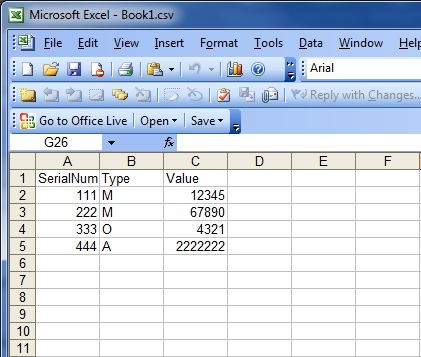
Example using 'token' to parse a .csv file:
Assume you have an excel
spread sheet (saved in .csv format) similar to this one...
The following script will parse that file:
# CSV_PARSE:
SET CSVFILE
"C:/Users/Ed/Documents/Book1.csv"
SET ROWTOT 5
SET COLTOT 3
SET ROW 1
SET COL 1
# NEXTCOL:
FILE token
"$CSVFILE" $COL $ROW ,
ECHO
"${FILE} \c"
SET COL=$COL+1
IF $COL le $COLTOT
GOTO NEXTCOL
SET ROW=$ROW+1
ECHO ""
IF $ROW gt $ROWTOT
GOTO CSV_DONE
SET COL=1
GOTO NEXTCOL
# CSV_DONE:
ECHO All done
EXIT
And generate this output at the uCon console:
SerialNum
Type Value
111
M 12345
222
M 67890
333
O 4321
444
A 2222222
All
done
This
basic idea can be used to parse any size spreadsheet by simply
modifying the ROWTOT/COLTOT values.